
FrequentlyAsked Questions
Getting Started with We Work Remotely
What is We Work Remotely?

We Work Remotely is the world's largest community of remote workers and the number one destination for finding quality remote jobs. On average, over 1000 new positions are posted every month.
We Work Remotely launched publicly in 2011. Since then, we have seen over 38K jobs posted to our platform and have had job seekers visit us from 99% of the countries on Earth. Remote work is truly taking over the world!
Check out: WWR Statistics
Navigating WWR
Do you have any remote jobs?
We Work Remotely connects awesome remote talent (like you) with amazing remote companies. What does this mean? Basically, companies post job listings for roles they're hiring for and job seekers browse the job listings for roles they want to apply for.
When WWR is hiring, we'll post our jobs on the job board. Otherwise, don't miss out on applying for the thousands of opportunities that are listed!
How can I find a remote job?
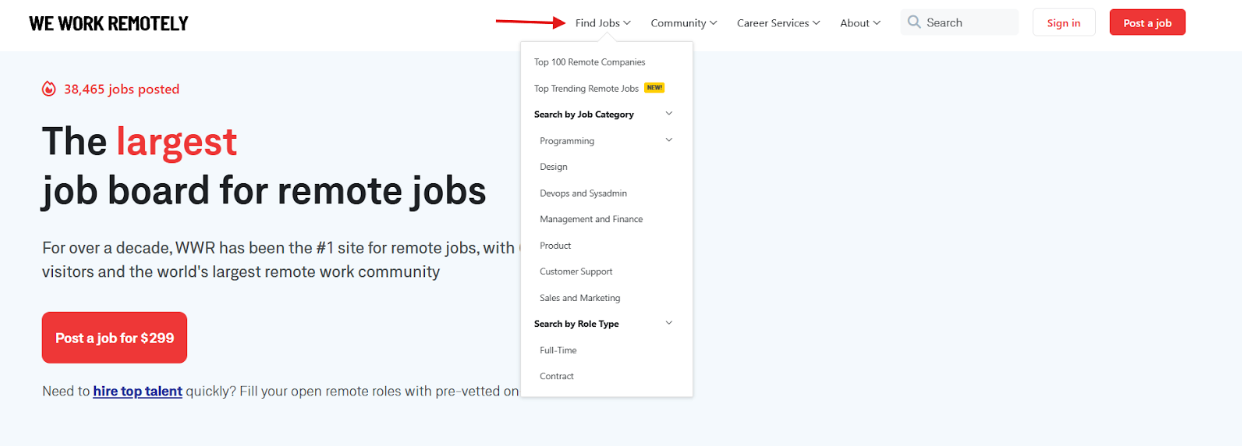
Begin your job search by exploring our job board and utilizing the available filters. For easier navigation, the top menu provides access to specific job listings, including those from the Top 100 Remote Companies, trending opportunities, and searches categorized by role type.
Here are some resources to help you start looking for a remote job: Remote Work Resources.
How can I start applying for remote jobs?
Once you've identified and reviewed a remote job listing for which you are qualified, you can apply by clicking the red "Apply for this position" button.
The application method will depend on the hiring company's process. You will either be redirected to their website or Applicant Tracking System (ATS) to complete the application, or instructed to submit your application via email.
I live outside of the US. Can I apply to any job listings?
Keep an eye out for the regional tag that's associated with each job posting. If you see 'Anywhere in the World' or the region you're able to work from, you can apply! Be sure to always thoroughly read the job listing for extra details.
How can I sign up to receive job seeker notifications?
Get daily email notifications that are tied to your tailored search preferences (category, region and time zone). Create an account here. Once you've verified your account, you'll be taken to a short onboarding where you can opt-in.
I've applied for a job and they haven't replied back, what should I do?
Hiring managers are busy! Sometimes you won't hear back from them. So, it's always a great practice to follow up after waiting a reasonable amount of time (general standard two weeks). And, remember, kindness always wins.
This job isn't actually remote. What should I do?
We are a remote-dedicated job board. That being said, not all jobs are fully remote in nature. Meaning, many companies have hiring restrictions that only allow them to hire in certain countries or time zones. If you see a job listing that's tied to a city or requires you to be in the office a few times a week, reach out to support@weworkremotely.com and notify us.
How do I tell if a job posting is a scam?
There are some common warning signs:
- Extremely unprofessional job posts
- A crazy high salary despite a super vague job description
- You're asked for confidential information
See more signs and details here.
I need to report a fraudulent job posting or company. What should I do?
We take these very seriously! Send an email to support@weworkremotely.com with the link to the job posting and we will look into it.
Do you have courses available?
Our course page is currently under construction, but your learning doesn't have to wait. Dive into our latest insights and guides on our blog.
Job Listing Types
What do the different job listing colors and icons mean?
On We Work Remotely, different listing styles help you quickly identify the type of opportunity and how you can apply.
Types of Listings
- Boosted Jobs: Jobs available to all users, with and without an active subscription.
- Hot Jobs: Verified Employer listings posted directly on We Work Remotely.
- Mega Placements: Premium hiring campaigns with enhanced visibility for employers recruiting at scale.
Each serves a different purpose, helping you discover opportunities that match your preferences.
Types of Tags
- Featured: The employer has paid for additional upgrades to be featured more prominently on the site.
- Top 100: Global companies that have the most experience hiring remote workers.
What are Boosted Jobs?
Boosted Jobs are employer listings that are available to all users, whether you have an active subscription or not. These jobs are promoted to reach more candidates, and employers have chosen to allow direct applications without requiring a subscription.
If you're looking for the fastest way to apply, use the Boosted Jobs filter to see only these listings. You can also identify them by the Boost rocket icon.
What are Hot Jobs?
Hot Jobs are verified employer listings posted directly on We Work Remotely. These are active hiring opportunities from employers investing in reaching remote talent through our platform. They have a fire icon next to the job name.
What are Mega Placements?
Mega Placements are premium employer campaigns for companies hiring at scale.
Instead of promoting a single role, Mega Placements showcase employers recruiting for multiple positions or entire teams.
They receive enhanced visibility across We Work Remotely and may also appear in additional promotional placements, such as newsletters or featured sections.
How are Mega Placements different from regular job listings?
Regular job listings typically promote a single position.
Mega Placements are designed for employers with larger hiring initiatives and receive additional exposure across the platform to help them reach more qualified remote candidates.
Can I filter by job type?
Yes. You can use filters throughout We Work Remotely to quickly find the types of listings you're most interested in, including Boosted Jobs.
Filtering helps you tailor your job search and discover opportunities that best fit how you prefer to apply.
Why do some jobs have more visibility than others?
Some employers choose promotional products that increase the visibility of their listings across We Work Remotely.
These enhanced placements help employers reach more candidates while still maintaining a high-quality browsing experience for job seekers.
Job Seeker Account
Why should I create an account?
We know how tedious and noisy job hunting can be. We help you find the best remote opportunities by tailoring them to you. You'll have your own tailored view of remote jobs filtered by the regions you're able to work from, preferred time zones, and categories.
We Work Remotely offers three membership tiers:
- Basic (Free) — Browse jobs, save listings, upload your resume, and follow companies.
- WWR Pro ($14.95/month) — Everything in Basic plus unlimited job applications, up to 5 custom job alerts, and subscriber-only events.
- TopAccess ($29.95/month) — Everything in Pro plus access to partner marketplaces (Toptal, Arc, PeoplePerHour), unlimited Toptal Resume tailoring, and eligibility for a performance reward of up to $500. Eligibility, proof of earnings, and Terms & Conditions apply.
Do I need an account to use WWR?
You sure do! To browse and apply for remote jobs on WWR, you'll need to create an account.
Choose the plan that fits your job search:
- Basic — Free. Browse and save jobs, upload your resume, follow companies.
- WWR Pro — $14.95/month (12-month commitment, first month $2.95). Unlimited job applications, up to 5 custom alerts, and subscriber-only events.
- TopAccess — $29.95/month (12-month commitment, no free trial). Everything in Pro plus partner marketplace access, unlimited resume tailoring, and eligibility for a performance reward of up to $500. Eligibility, proof of earnings, and Terms & Conditions apply.
You can manage your account anytime from your settings.
Where can I sign up?
You can create an account here.
Can I upload my resume on the free plan?
Yes. Resume upload is included in Basic.
Do I get a resume review on the free plan?
Yes. A free ATS resume check by Toptal Resume is included in Basic. Upon sign-up or from your existing user dashboard (under Profile), upload your resume, enter your target job title, and check the box to receive an instant resume score, ATS score, and feedback via email. If you don't have a job seeker account you can also visit this link.
TopAccess members get unlimited Toptal Resume tailoring — submit as many versions as your job search requires at no extra cost.
What is TopAccess?
TopAccess is our premium membership tier at $29.95/month. It bundles WWR Pro with access to leading talent marketplaces and tools worth $300+/month in value, so you can find and land remote work faster.
TopAccess is a 12-month commitment, billed monthly. There is no free trial. Eligibility, proof of earnings, and Terms & Conditions apply.
What's included in TopAccess?
TopAccess includes everything in WWR Pro, plus:
- Toptal Marketplace — An exclusive talent marketplace connecting professionals with global clients. Value: $100+/month.
- Arc — A curated platform for freelance and full-time remote opportunities across tech and digital roles. Value: $100+/month.
- PeoplePerHour — A freelance marketplace for project-based work and service listings. Value: $39.95/month.
- Toptal Resume — Unlimited resume tailoring and ATS optimization. Value: $19.95/month.
- Performance Reward — Earn a one-time reward of up to $500 for reaching a revenue milestone on Toptal, Arc, Upwork, or Fiverr.
Rewards subject to eligibility and verification. Subscription does not guarantee platform acceptance, jobs, or earnings. Terms & Conditions apply.
How is TopAccess different from WWR Pro?
WWR Pro ($14.95/month) focuses on your job search on We Work Remotely — unlimited applications, custom job alerts, and subscriber events.
TopAccess ($29.95/month) includes everything in WWR Pro and adds:
- Access to partner marketplaces: Toptal, Arc, and PeoplePerHour
- Unlimited Toptal Resume tailoring and ATS optimization
- Eligibility for a one-time performance reward of up to $500
Both plans are 12-month commitments, billed monthly. TopAccess has no free trial. Eligibility, proof of earnings, and Terms & Conditions apply.
Is acceptance into partner platforms guaranteed with TopAccess?
No. TopAccess gives you the opportunity to apply to partner platforms like Toptal, Arc, and PeoplePerHour, but acceptance is not guaranteed. Each platform has its own vetting process and eligibility criteria.
Your TopAccess subscription provides access to apply — it does not guarantee platform acceptance, jobs, or earnings. Terms & Conditions apply.
How does the TopAccess performance reward work?
TopAccess members are eligible to earn a one-time reward of up to $500 for reaching a qualifying revenue milestone on Toptal, Arc, Upwork, or Fiverr.
Rewards are subject to eligibility and verification — proof of earnings is required. Subscription does not guarantee platform acceptance, jobs, or earnings. See the full Terms & Conditions for details.
Subscription & Pricing
What's the difference between Basic, Pro, and TopAccess?
We Work Remotely offers three membership tiers:
- Basic (Free) — Browse and organize your search: one tailored feed, resume upload, save jobs, follow companies, a free ATS resume review, and LinkedIn verification.
- WWR Pro ($14.95/month, 12-month commitment, first month $2.95) — Everything in Basic plus unlimited job applications, up to 5 custom job alerts, and subscriber-only events and Q&A sessions.
- TopAccess ($29.95/month, 12-month commitment, no free trial) — Everything in Pro plus access to Toptal Marketplace, Arc, and PeoplePerHour; unlimited Toptal Resume tailoring; and eligibility for a one-time performance reward of up to $500. Eligibility, proof of earnings, and Terms & Conditions apply.
What is TopAccess?
TopAccess is our premium membership tier at $29.95/month. It bundles WWR Pro with access to leading talent marketplaces and tools worth $300+/month in value, so you can find and land remote work faster.
TopAccess is a 12-month commitment, billed monthly. There is no free trial. Eligibility, proof of earnings, and Terms & Conditions apply.
What's included in TopAccess?
TopAccess includes everything in WWR Pro, plus:
- We Work Remotely Pro — Access to the largest remote job board. Value: $14.95/month.
- Toptal Marketplace — An exclusive talent marketplace connecting professionals with global clients. Value: $100+/month.
- Arc — A curated platform for freelance and full-time remote opportunities across tech and digital roles. Value: $100+/month.
- PeoplePerHour — A freelance marketplace for project-based work and service listings. Value: $39.95/month.
- Toptal Resume — Unlimited resume tailoring and ATS optimization. Value: $19.95/month.
- Performance Reward — A one-time reward of up to $500 for reaching a revenue milestone on Toptal, Arc, Upwork, or Fiverr.
Rewards subject to eligibility and verification. Subscription does not guarantee platform acceptance, jobs, or earnings. Terms & Conditions apply.
How does TopAccess billing work?
TopAccess is billed at $29.95/month as part of a 12-month commitment. There is no free trial. Your subscription begins on the date of sign-up and renews monthly until the end of your 12-month term.
You can manage your subscription from your account dashboard at any time.
Is there a free trial for TopAccess?
No. TopAccess does not include a free trial. Your subscription begins at $29.95/month from the date of sign-up.
What does the TopAccess 12-month commitment mean?
When you sign up for TopAccess, you're committing to a 12-month term. If you cancel early, billing and access continue through the remainder of the term. Payments are spread monthly at $29.95/month for convenience.
Can I cancel my TopAccess subscription?
Yes, you can cancel at any time. However, your subscription — and billing — continues through the end of your 12-month term. You'll keep full access to all TopAccess benefits until your term ends.
To cancel, log in to your account, go to Subscriptions, and turn off auto-renewal.
Is acceptance into partner platforms guaranteed?
No. TopAccess gives you the opportunity to apply to partner platforms like Toptal, Arc, and PeoplePerHour, but acceptance is not guaranteed. Each platform has its own vetting process and eligibility criteria.
Your subscription provides access to apply — it does not guarantee platform acceptance, jobs, or earnings. Terms & Conditions apply.
How does the performance reward work?
TopAccess members are eligible to earn a one-time reward of up to $500 for reaching a qualifying revenue milestone on Toptal, Arc, Upwork, or Fiverr. Rewards are subject to eligibility and verification — proof of earnings is required.
Subscription does not guarantee platform acceptance, jobs, or earnings. See the full Terms & Conditions for details.
Where can I find the TopAccess Terms & Conditions?
The TopAccess Terms & Conditions are available at weworkremotely.com/terms-and-conditions. Eligibility, proof of earnings, and Terms & Conditions apply to all rewards and partner marketplace access.
Is Pro a monthly subscription?
Pro bills monthly at $14.95/month, 12-month commitment, first month $2.95.
What does "12-month commitment" mean?
It means you're signing up for a 12-month term. If you cancel early, billing and access continue through the rest of the term.
Can I cancel Pro at any time?
You can cancel anytime, but your subscription still runs until the end of your 12-month term (and you keep access during that time).
If I cancel, do I lose access right away?
No. You keep access through the remainder of your subscription term, even after cancellation.
Does Pro help me apply to more jobs?
Yes. Pro lets you apply to unlimited remote jobs with no restrictions.
How many job alert emails do I get with Pro?
Pro includes up to 5 custom job search alerts.
Does Basic include job alerts too?
Basic includes a tailored feed of job listings, but Pro is what unlocks multiple custom alerts.
What does "subscriber-only events" mean?
Pro members get access to webinars, events, and Q&A sessions designed to help you job search faster (and smarter).
Can AI apply to jobs for me?
Yes, you can use Job Copilot, an AI tool, to automatically apply to remote jobs on We Work Remotely. Set your search preferences, upload your resume, and answer common questions once. The copilot then daily scans for matches and submits polished applications for you, saving you time for interview prep. Weekly and Monthly plans are available. Learn more here.
Manage Your Subscription
How do I cancel my Job Seeker Pro subscription?
To cancel, you'll need to turn off Subscription auto-renewal:
- Log in to your account
- Go to Subscriptions
- In the Subscription Settings panel, click "Cancel" and confirm the cancellation
- You'll see that your plan has been successfully canceled, along with your last access date
Once auto-renewal is turned off, your subscription will not renew, and you'll keep access until the end of your current term.
I can't find the cancel button
Go to the Subscription tab on your dashboard, if you don't see a "Cancel" button and instead see "Re-enable," your subscription has already been successfully canceled. You can confirm your Last Access date under Subscription Settings.
If you need confirmation or more details about your subscription status, please email support directly at support@weworkremotely.com.
I want to delete my account.
First, cancel all active subscriptions. Then, in your dashboard's Account Settings, scroll down and click “Delete my account.” For issues, contact support@weworkremotely.com for assistance.
The dashboard is displaying incorrect information about my subscription.
For dashboard errors or missing subscription status, email support@weworkremotely.com with your account email and details for assistance.
How do I update my card on file?
Go to the Subscription tab on your dashboard. If you have an active subscription, you'll see a Payment Method section showing the current card on file. To update it, click 'Change,' enter the new payment details, and confirm. Your next payment will be processed using this new method.
Best Practices for remote job hunting
Job Search
5 Simple Yet Effective Tips to Strengthen Your Remote Job Search
Work at Home Jobs: How to Tell a Legitimate Remote Job from a Scam
Best Remote Companies: Top Signs They're Right For You
7 Signs a Remote Company is Committed to Diversity, Equity, and Inclusion
Common Remote Job Scams to Avoid and How to Spot Them Easily
Improving your application
Getting Started with We Work Remotely
What is We Work Remotely?
We Work Remotely is the world's largest platform for finding and listing remote jobs. We have over 6 million unique visitors to the site and over 1000 new positions posted every month.
We Work Remotely launched publicly in 2011. Since then, we have seen over 38K jobs posted to our platform and have had job seekers visit us from 99% of the countries on Earth. Remote work is truly taking over the world!
How do I post my job?
If you're a Guest:
1. Click on 'Post a Job'
Fill in the details of the job and your company profile - be sure to include your location restrictions if you have 'em!
If you've posted with us before, you may choose to only fill in your company name and email and the company information will be pulled in from your last posting. Be sure to be consistent with your company name! (Ex. 'Company Name Inc' vs 'Company Name')
2. Select an upgrade (not mandatory, but recommended)
The base price for a job listing on We Work Remotely is $299 per month. Choose one of our optional upgrades to raise the visibility of your listing.
3. Purchase the listing
Preview your listing, go back and make changes if needed, and once you are ready to post it you can add your billing information. Then sit back and let the applications flood in! No other sign up or login is required.
All payments are processed securely by Stripe.
Create an account for a faster posting experience!
Create your account here. If you already have signed up, log in here.
How long does my job listing stay live for?
We Work Remotely job postings last 30 days and automatically renew for convenience. To limit a posting to one month, easily turn off auto-renewal anytime. A reminder email is sent 5 days before renewal.
What is the auto-renewal?
Job listings auto-renew every 30 days for customers preferring longer posting times. You can disable auto-renewal anytime via the purchase receipt email or your account dashboard. Create an account here.
Job Posting Pricing & Upgrades
How much does it cost?
The base price for a job listing on We Work Remotely is $299 per month.
How can I help my ad stand out?
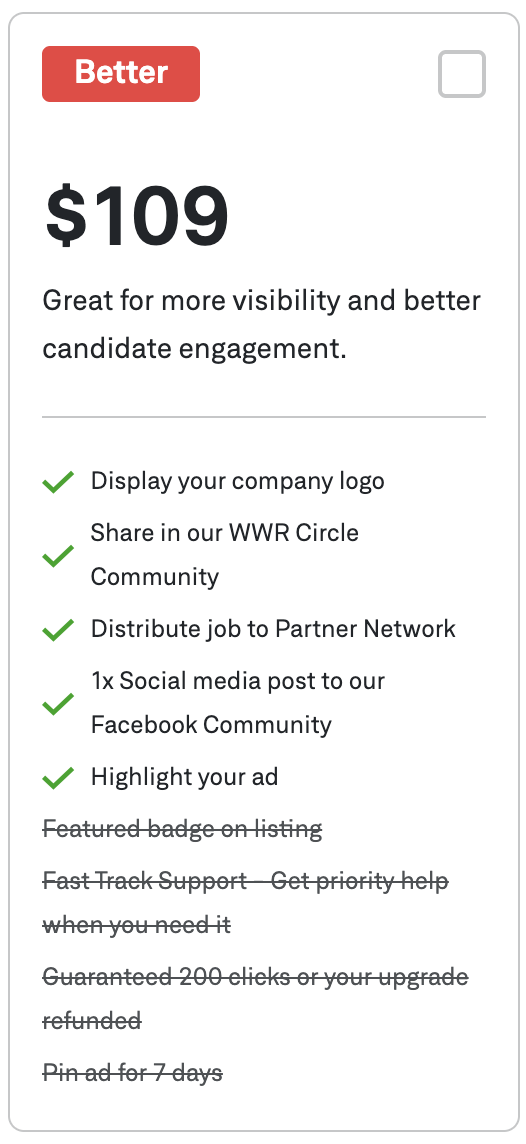
You can choose one of our optional upgrade options - Good, Better, and Best - to gain more visibility to your listing:
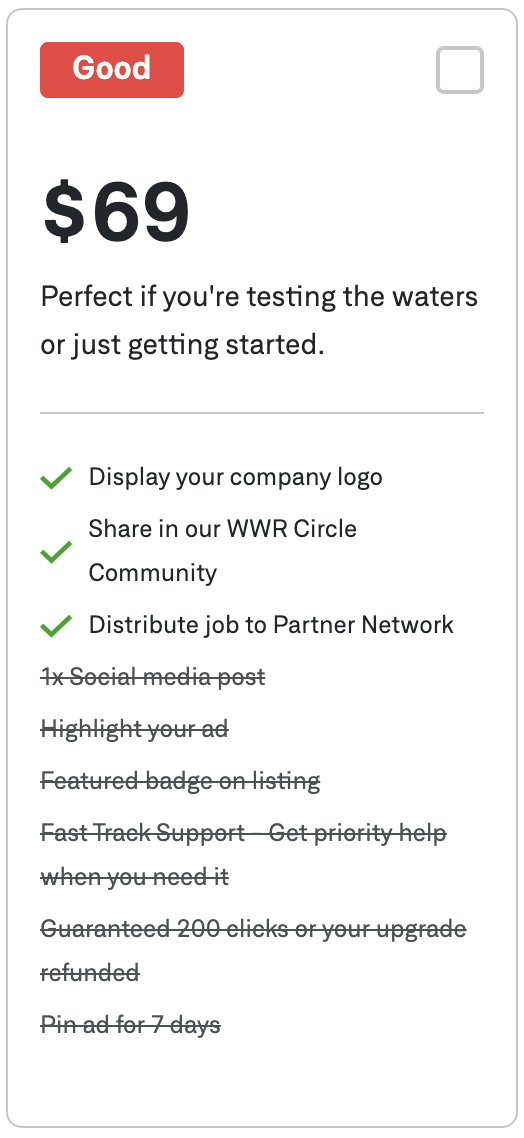
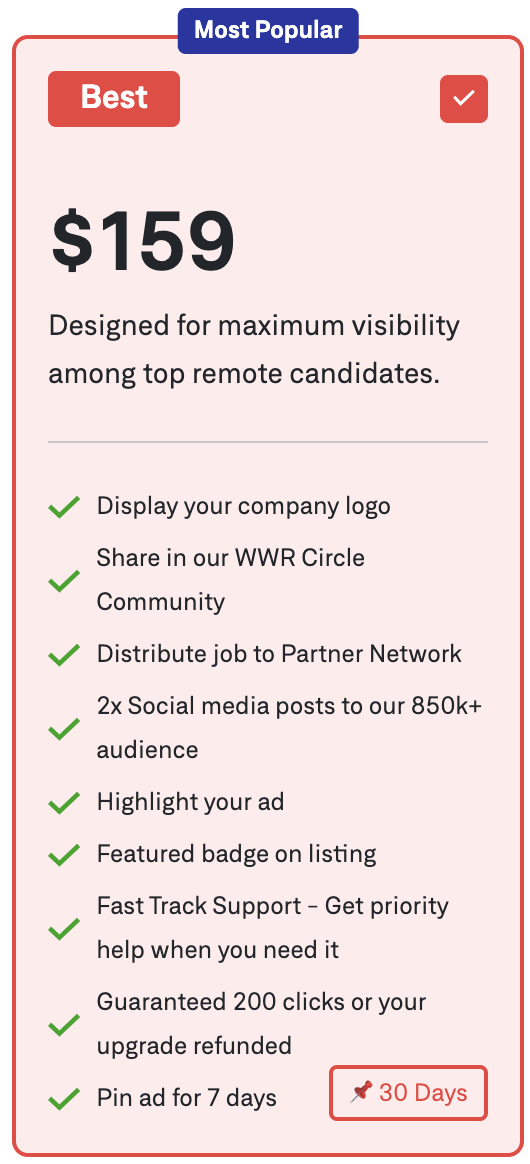
- Good: Great for getting started, with essential visibility and promotion features.
- Better: Increased visibility and engagement to attract more candidates.
- Best: Maximum exposure and top results with the highest level of promotion.

What is Boost?
Boost is a one-time $199 upgrade that maximises the response rate for your job listing.
Boosted listings:
- Reach our full audience
- Get priority placement in the weekly newsletter
- Get priority exposure in our remote community
- Receive roughly 5x more applications
Do you offer any discounts for buying more than one job at a time?
We offer bundle packages, allowing you to purchase multiple job listings simultaneously and save up to 40% per post. To get started, simply choose the desired number of listings, provide your company details, and upon payment, you will receive a coupon to use for posting your jobs. For more details on how these bundles work, click here.
Filtering Service
Filtering Service Next Steps? After sign-up, our team reviews and sorts all candidate applications based on your requirements.
Who Reviews? A human, not a bot, reviews your job description and prioritizes applicants based on your provided requirements.
How is Filtering Done? Candidates are prioritized based on technical requirements, regional restrictions, experience, and other criteria. We prioritize, but do not remove, any applicants.
Candidate Information Schedule? You'll receive emails on this schedule: Batch 1 - 7 days; Batch 2 - 14 days; Batch 3 - 21 days; Batch 4 - 30 days after posting.
After Receiving Candidate Information? Use the provided information to interview and make your hiring decision.
Filtering Service Cost? $199, auto-renewing with your job posting.
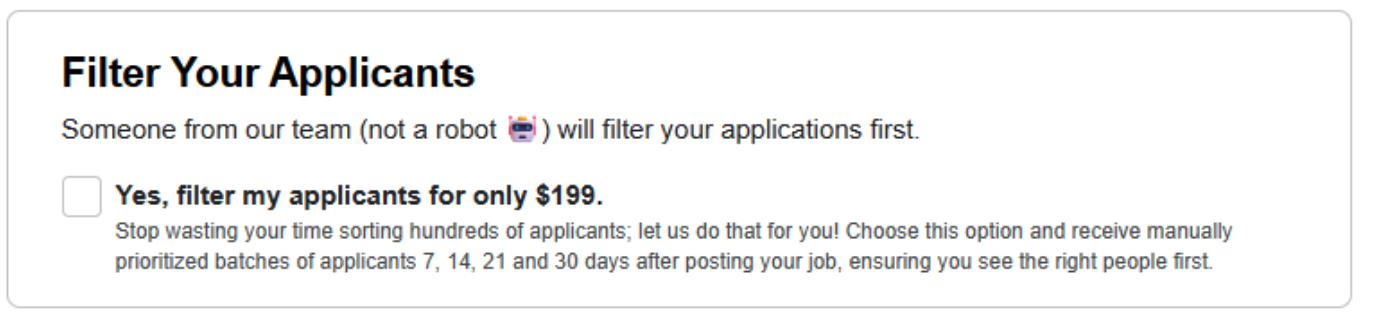
Pairs especially well with Boost: If you've Boosted your listing and are receiving a high volume of applications, the Filtering Service helps our team surface the strongest matches from the larger pool — so you spend less time sorting and more time interviewing.
Do you have any tips for creating a successful job listing?
We're so glad you asked! Here's How to Write a Remote Job Listing that Sells.
Mega Placements
What is a Mega Placement?
A Mega Placement is a 30-day campaign that keeps your hiring page or a priority job post at the top of the We Work Remotely job feed, giving it premium visibility among 6M+ monthly remote job seekers.
How much does a Mega Placement cost?
Mega Placements are tailored to each company’s hiring goals. Contact our team for a custom quote.
To get started or discuss options, fill out our sales form and our team will be in touch.
What's included in a Mega Placement?
Every Mega Placement includes:
- Locked top-of-feed placement — your brand stays pinned for the full 30 days
- Direct traffic to your platform — candidates click through straight to you
- Co-branded email blast — promoted to our engaged subscriber base
- Newsletter mention — featured in the WWR newsletter
- Dedicated support — a team member to help you get the most from your placement
How does a Mega Placement compare to a standard job listing?
A standard job listing ($299 for 30 days) moves down the feed as new jobs are posted. A Mega Placement stays pinned at the top for the full 30 days, delivering premium visibility and 35x more views than a featured job post.
Mega Placements also include dedicated email promotion and a feature in the WWR newsletter, which are not included with standard listings.
Who is Mega Placements designed for?
Mega Placements is built for companies that need to hire at scale — particularly:
- Marketplaces — grow supply and onboard talent faster
- Gig platforms — drive continuous worker applications
- AI & data labeling companies — recruit annotators and AI contributors in volume
If you're filling multiple roles or need a steady pipeline of remote candidates, Mega Placements is built for you. Talk to our team to see if it's the right fit.
Remote Hiring Rules & Location
How do I promote my role as 100% Remote?
To post a "fully remote" job on WWR, select 'Yes' for 'Is this Role Fully Remote?' during posting. This signifies the hire can work globally without location or timezone restrictions, and the posting will receive the 'Anywhere in the World' tag.
What if I can only hire from specific countries?
GeoLock is a feature that lets you limit job visibility to specific countries, ensuring only candidates from selected regions can apply.
Key Details:
- Targeted Visibility: Select countries for region-specific hiring or legal needs.
- Higher Relevance, Lower Volume: Reduces applicant pool (up to 10x) but increases quality/relevance.
- One-Time Fee: $99.00 per listing.
- Locked After Publishing: Please note that once your job is live, GeoLock settings cannot be edited—be sure to confirm your selections before publishing.
For step-by-step instructions, check the job posting form, or contact our support team if you need assistance.
ATS & Integrations
Managing Your Job Listings
Where can I get my receipt?
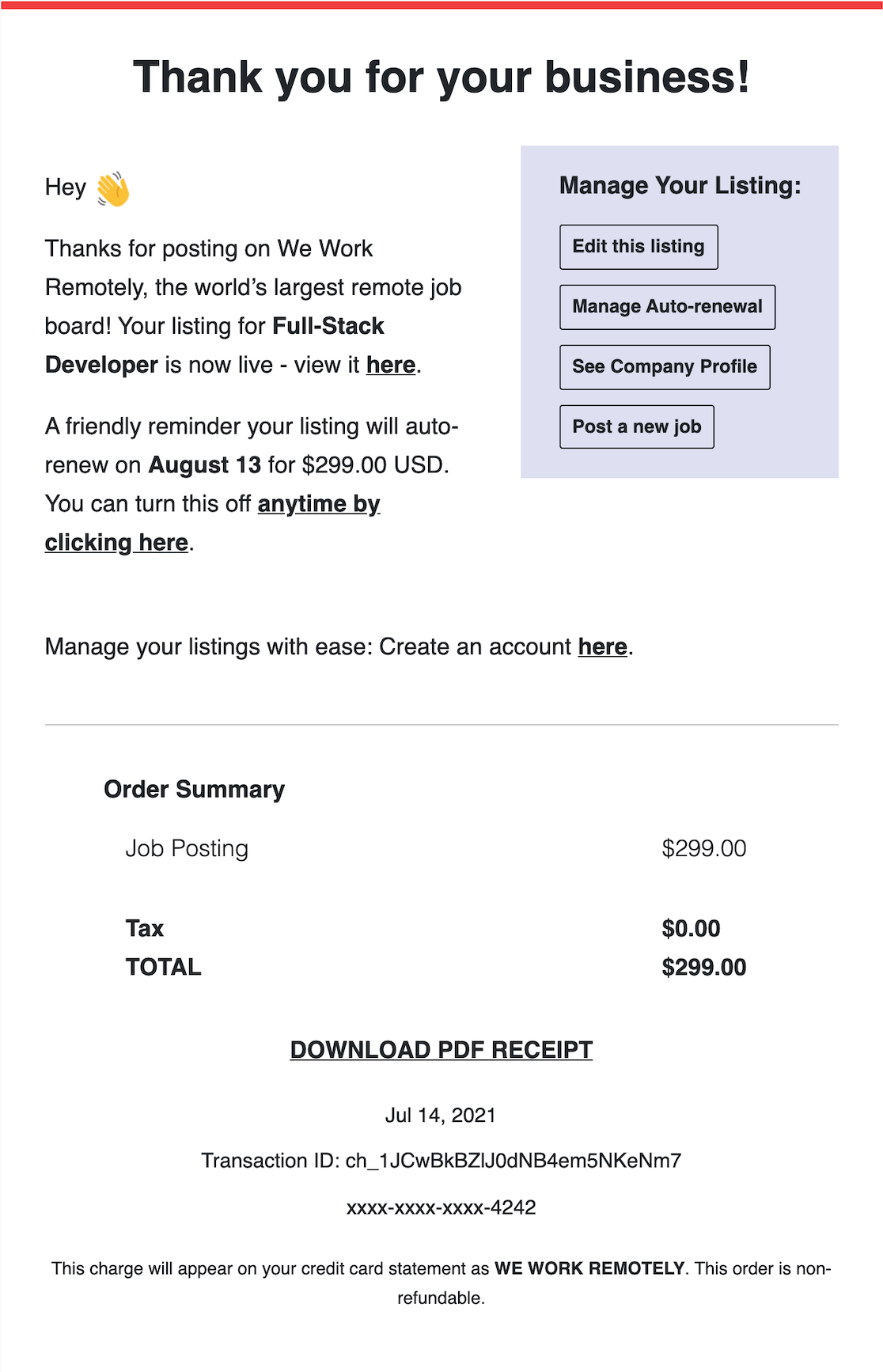
Once your job has been posted successfully, a receipt will be emailed to you immediately.
If you're a guest: Keep this email receipt handy because it includes direct links to edit your post and manage your auto-renewal.
If you have an account:
Log in to your account and head to the Billing tab to download PDF versions.
Can I get an invoice and/or receipt with our company billing details on it?
At this time, only account holders have access to this feature.
Log in to your account and head to the Billing tab. Enter the billing information and your future job postings will have this information incorporated.
How do I change the billing details for my listings?
Billing details are linked to each job listing, this means every time you want to upload a new job listing, you need to add your billing details.
If you don't have any active job listing, there's no need to change your billing information on them, unless you want to reactivate them.
For the job listings that are active, just go to your company profile, click on "Edit Listing" and scroll down to where it says "Update billing details."
How do I edit my job posting?
If you're a Guest:
Check your email receipt for the direct edit link and your Company Profile link (we suggest bookmarking it!). If you can't find the links, email us at support@weworkremotely.com.
If you have an Account:
Log in to your company dashboard. Go to the Manage Listings tab. Click the "edit" link next to the listing.
Reminder: Listings are live for 30 days and auto-renew unless canceled. Watch for a reminder email five days before renewal.
How do I cancel my listing or auto-renewal?
If you're a Guest:
To cancel auto-renewal or remove a job:
- Use the Edit Link (from your Email Receipt or Company Profile).
- Click 'Manage Auto-renewal' dropdown and select the link.

- Choose to cancel auto-renewal (leaving the listing live) or cancel and remove the listing entirely (e.g., after hiring).

If you have an Account:
Log in to your company dashboard and click "Manage Auto-Renewal" on the specific listing.
My job post auto-renewed but I didn't want to renew it, can I get a refund?
You can receive a full refund if you request it within 7 days of your renewal date. To initiate the refund process and ensure your job listing is closed to new applicants, please email support@weworkremotely.com. We are unable to issue refunds after the 7-day period has passed because the job listing will have already been distributed across our partner sites, incurring associated fees.
Can I renew an expired listing?
If you're a Guest:
Visit your unique company page, found through the receipt sent after posting and scroll down to the list of jobs. Identify the listing you'd like to renew and click on "renew listing" under the title.
If you have an Account:
You sure can! Log in to your company dashboard and click on the 'Renew listing' link on the respective listing.
Where can I see stats?
If you're a Guest:
Head to your Company Profile page (you can find the direct link in any of your email receipts). Scroll down to your listings to see the stats.
If you have an Account:
Log in to your company dashboard to edit your listing(s).
Stats you can monitor:
- Unique page views
- The number of unique clicks on the 'Apply for job' button
Since we're not part of the application process, unfortunately, we're not privy to exactly how many applicants you've received. To see which applicants came from WWR, we recommend using a bit.ly link or tracking this through your ATS provider or Google Analytics.
Employer Accounts & Subscriptions
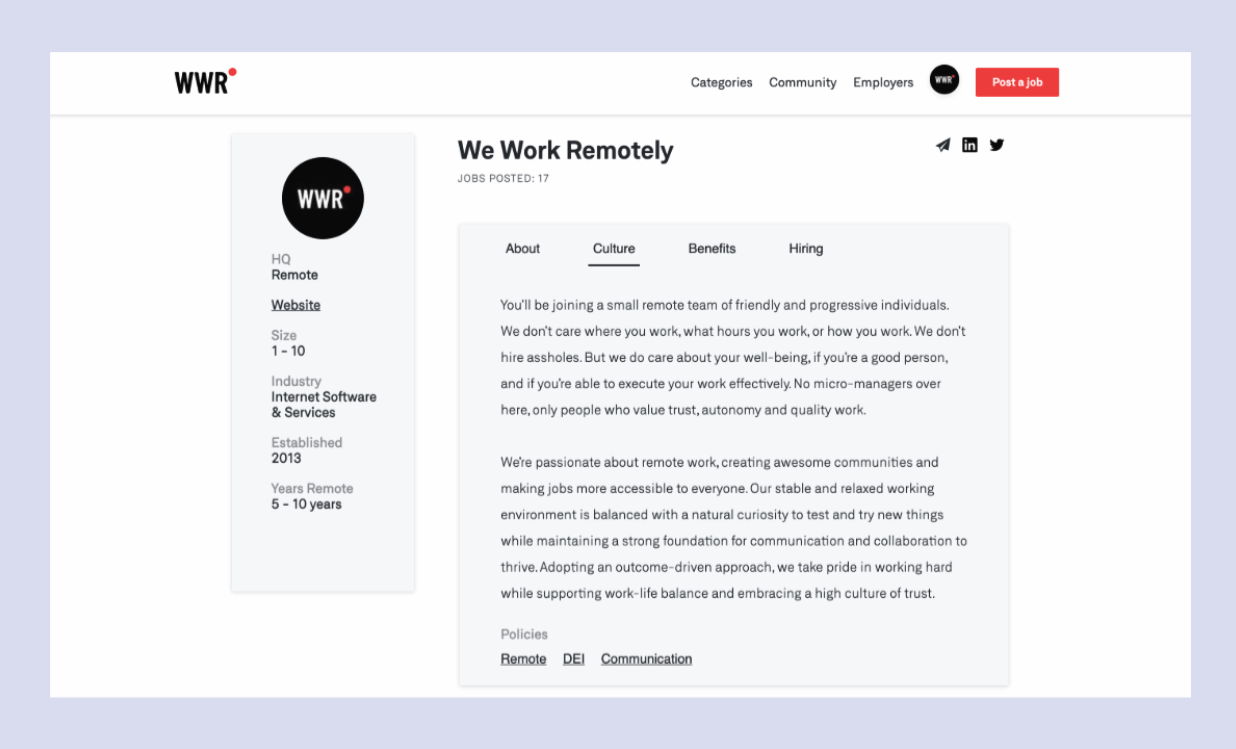
How do I update my live company profile?
Sign up for an account to add information about the company culture, benefits and hiring process. Once logged in, head to the Company Profile tab and update your details.
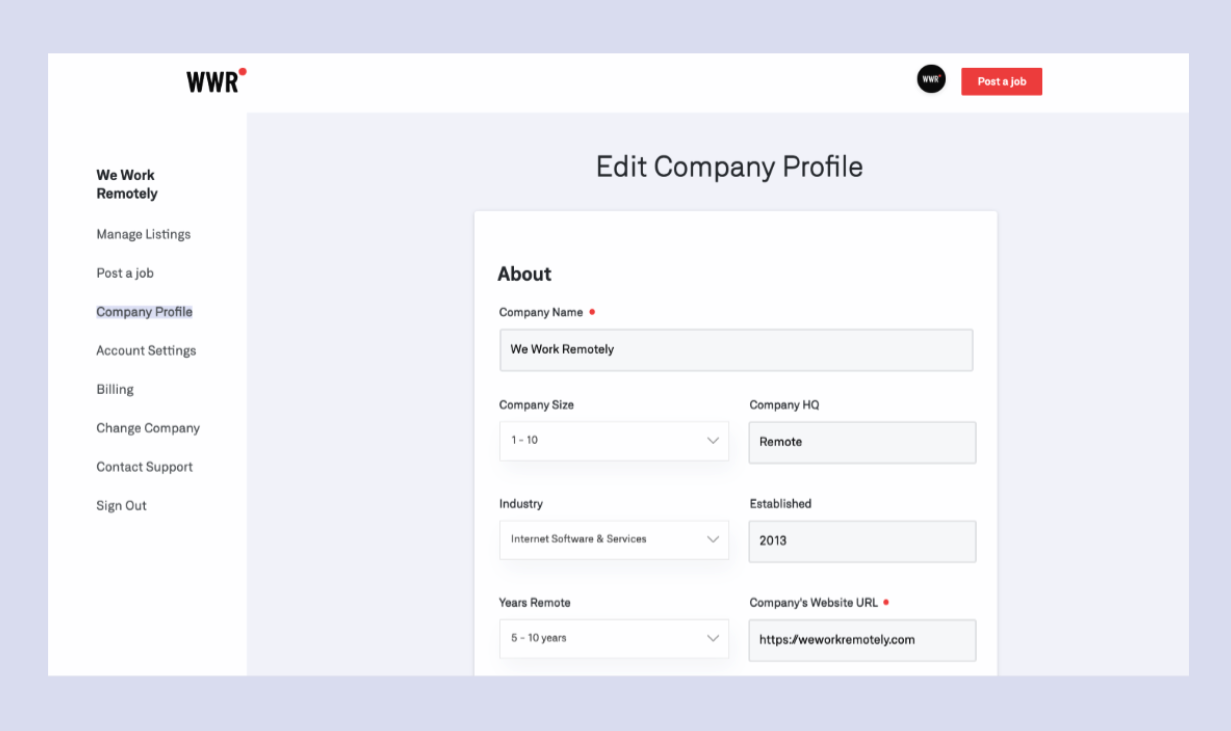
We recommend keeping it succinct and talking directly to your ideal candidates.
This way, not only are you standing out as a remote company, but you're also attracting future team members that align with your values and overall mission.
Do I need to have a Pro Employer Account to post job listings at We Work Remotely?
No, you don't need a Pro Employer Account or subscription to post jobs at We Work Remotely or use any of the features you've used before. Everything you've had access to at We Work Remotely will remain free.
Benefits of having a Basic Employer Account
Our Basic Employer Account at We Work Remotely gives you many benefits. By signing up, you can:
- Manage all your job listings from one place
- Manage more than one company from the same account
- Share the management of a company's listings and profile with several people in your team
- Add more information to your company profile, like culture, benefits, and hiring process
- Add billing details to future invoices
- Download all your invoices
Benefits of having a Pro Employer Account
Besides having access to everything that is available for our Basic Employer Account, when you get a Pro Employer Account, you have access to:
- All features from the Basic Employer Account +
- Pro Employer Account badge
- 10% discount on every job listing
- Company booth at our next Job Fair
- Exclusive events and sponsorship packages
How do I upgrade my account?
To upgrade your account, go to the Account Settings of your Employer Account.
How do I cancel my subscription?
To cancel your subscription, go to your Account Settings of your Employer Account.
How is the 10% discount on all job listings applied?
Discounts are applied automatically when you are logged in to your Pro Employer Account. Make sure you're logged in to your Pro Employer Account, and managing the right company for the discount to be applied.
How much does the Pro Employer Account subscription cost?
$99 USD per month billed monthly, quarterly or annually. You can also save 10% if you switch to an annual subscription.
Payroll & Recruitment
How can I pay the people I hire?
We've partnered with HireGlobal to simplify building and managing a global, distributed team, from sourcing to onboarding. HireGlobal manages contracts, payments, and compliance across 150+ countries. Key features include paying in 150+ countries with no platform fees, easy multi-currency payments, and staying compliant with local laws and taxes. Click here to learn more.
Do you offer help with hiring or recruitment services?
For more hiring help, our sister company, WALTER, provides cost-efficient recruitment solutions, connecting you with skilled remote professionals from Latin America and the Philippines. They manage the entire hiring process (sourcing, screening, interviews, onboarding) to help you build your team faster.
WALTER offers:
- Fast access to experienced, pre-vetted, matched talent.
- Comprehensive, end-to-end recruitment with minimal effort from your team.
- Cost savings (up to 80% compared to North American salaries).
- A 12-month satisfaction guarantee with a free replacement.
Learn more here.
Sponsorship Opportunities
Promote your product or service to a highly targeted audience through our multiple sponsorship options. Reach over 600,000 newsletter subscribers and millions of job seekers and remote professionals on our website via premium banner spots. Sponsoring with us increases brand awareness and generates high-quality leads among a globally engaged audience actively seeking work and career solutions. Contact us at hello@weworkremotely.com for interest.